



Instagram’s profile grid has become a key part of how users customize their profiles and stand out. Many people carefully arrange posts to create a specific aesthetic, turning their grid into more than just a collection of photos. The downside was that uploading something out of order could throw off the entire layout, often forcing users to delete and repost content. Thankfully, that’s no longer necessary.
Instagram has announced a new feature that allows users to reorder their profile grid, giving them more control over how their profiles appear without having to remove existing posts.
We were able to verify that the feature is live on Instagram version 433.0.0.47.68 for Android while testing on a Pixel 10 Pro XL.
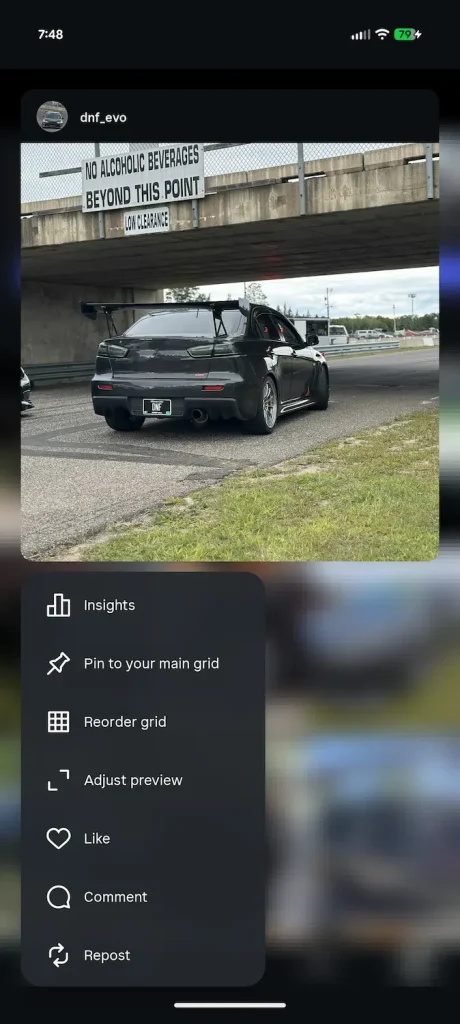
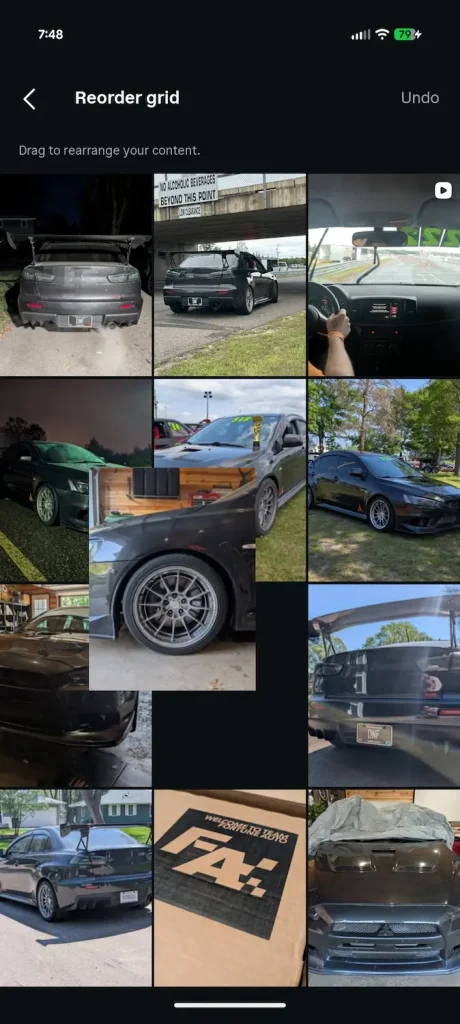
How to reorder your Instagram grid
- Go to your profile, to pull up your Grid
- Press and hold any photo (selection doesn’t matter at this point)
- A menu will pop up, select “Reorder grid”
- Press and hold any image you wish to reorder
- Once you release the image in place, the app auto saves (there is an undo button)
The process is simple and only takes a few seconds, making it much easier to maintain a curated profile without having to delete and re-upload content.
Reordering posts has been one of Instagram’s most requested profile customization features for years, particularly among creators, photographers, brands, and businesses that rely on a carefully organized grid. The new feature gives users significantly more flexibility over how their profiles appear to visitors.
Are you looking forward to the ability to reorder your Instagram grid? Let us know in the comments below.
