

Close Menu
  • Home
  • News
  • Leaks
  • Reviews
    • Phone Reviews
    • Tablet Reviews
    • Accessory Review
  • Android
  • Apple
  • Windows
  • Wallpapers
  • Contact
    • Tip Us
    • Press release or product review
What's Hot

Google Pixel 11 Series Hits the FCC Ahead of Launch

July 13, 2026

Google’s Pixel Weather App Keeps Confusing Forecasts With Reality

July 8, 2026

iPhone Air 2 Could Get Bigger Battery as Apple Looks to Fix First-Gen Complaints

July 7, 2026
Facebook X (Twitter)
FWNEDFWNED
  • Home
  • News
  • Leaks
  • Reviews
    • Phone Reviews
    • Tablet Reviews
    • Accessory Review
  • Android
  • Apple
  • Windows
  • Wallpapers
  • Contact
    • Tip Us
    • Press release or product review
FWNEDFWNED
Home » Xiaomi is recruiting beta testers for Android Oreo on the Mi A1
Android

Xiaomi is recruiting beta testers for Android Oreo on the Mi A1

Matt KinneBy Matt KinneDecember 5, 2017No Comments2 Mins Read
Facebook Twitter Pinterest LinkedIn Tumblr Email
Xiaomi Mi A1 Android Oreo
Share
Facebook Twitter LinkedIn Pinterest Email

The Xiaomi Mi A1 has been a pretty well received device for the Android One program. It features decent specifications that include a dual rear-facing camera. Arguably, the biggest selling point of the Mi A1 is the fact that it runs a stock version of Android. That means it should theoretically get updates much sooner than other devices. Today, it seems that Xiaomi is recruiting beta testers for the Android Oreo update and here is how to sign up.

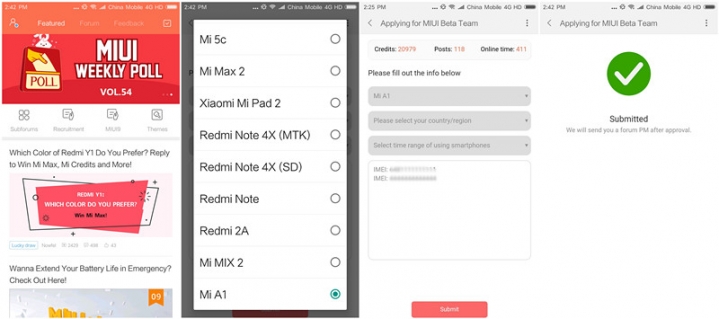
How to sign up for Android 8.0 Oreo on the Xiaomi Mi A1
Enroll Mi A1 Android Oreo Beta

In order to start the submission process, you will need to download the Xiaomi MIUI Forum app from the Google Play Store. I have embed it below. Once you have download the app, select Recruitment on the homepage. You will have to select the Mi A1 in the dropdown. Now that  you have your device selected, you will need to enter some of your device’s information.

As soon as you submit your device’s information, the MIUI team will send you a personal message on the forums to verify your submission. Once you are approved for the Android Oreo beta, you will receive an update OTA. No need to worry about downloading and flashing the update manually.
Mi A1 running Android Oreo
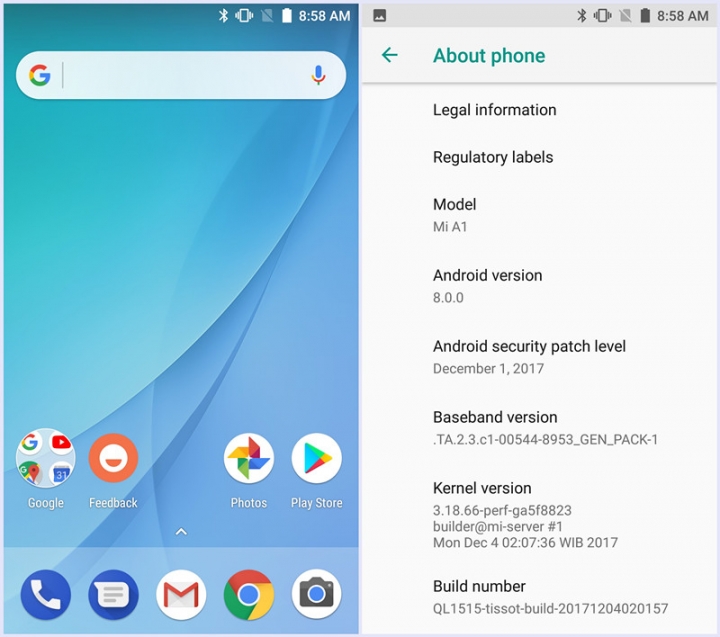
Xiaomi Mi A1 running Android Oreo

Although there are no bugs currently listed on this forum post, Xiaomi has stated that this is not a stable ROM and will contain bugs. It would be good to back up your files before downloading the full update and installing. If you do encounter any bugs or errors, you are encouraged to submit them here.

[appbox googleplay com.miui.enbbs]

Source

Android Oreo Mi A1 xiaomi Xiaomi Mi A1
Share. Facebook Twitter Pinterest LinkedIn Tumblr Email
Matt Kinne

I golf, autocross, and spend way too much time messing with new phones and gadgets. FWNED is where I share smartphone news, leaks, reviews, and whatever else catches my attention in the tech world.

Related Posts

Google Pixel 11 Series Hits the FCC Ahead of Launch

July 13, 2026

Additional Sony Xperia 1 VIII models appear in Qi certification database

July 7, 2026

Motorola Edge 70 Max picks up Qi certification ahead of launch

June 29, 2026

Qi Certification Reveals Samsung’s Galaxy Z Fold8, Fold8 Ultra, and Flip8 Magnetic Cases

June 25, 2026
Editors Picks

Google’s Pixel Weather App Keeps Confusing Forecasts With Reality

July 8, 2026

I Loved OnePlus, But I’d Trade It for OPPO’s Find Lineup in the U.S.

July 1, 2026

Can We Go Back to Real Smartphone Upgrades?

June 18, 2026

The Galaxy Watch Ultra convinced me Google needs a Pixel Watch Ultra

June 11, 2026
Related Posts

Google Pixel 11 Series Hits the FCC Ahead of Launch

By Matt Kinne

Additional Sony Xperia 1 VIII models appear in Qi certification database

By Matt Kinne

Motorola Edge 70 Max picks up Qi certification ahead of launch

By Matt Kinne
Advertisement
FWNED
Facebook X (Twitter)
  • Write For Us
  • About Us
  • Contact
  • Sitemap
  • Privacy Policy
© 2026 FWNED

Type above and press Enter to search. Press Esc to cancel.