

Close Menu
  • Home
  • News
  • Leaks
  • Reviews
    • Phone Reviews
    • Tablet Reviews
    • Accessory Review
  • Android
  • Apple
  • Windows
  • Wallpapers
  • Contact
    • Tip Us
    • Press release or product review
What's Hot

The Galaxy Watch Ultra convinced me Google needs a Pixel Watch Ultra

June 11, 2026

Instagram Finally Lets Users Reorder Their Grid, Here’s How!

June 11, 2026

Galaxy Watch Ultra 2 Leak Points to 35% Larger Battery and 3-Day Battery Life

June 10, 2026
Facebook X (Twitter)
FWNEDFWNED
  • Home
  • News
  • Leaks
  • Reviews
    • Phone Reviews
    • Tablet Reviews
    • Accessory Review
  • Android
  • Apple
  • Windows
  • Wallpapers
  • Contact
    • Tip Us
    • Press release or product review
FWNEDFWNED
Home » Instagram Finally Lets Users Reorder Their Grid, Here’s How!
Apps

Instagram Finally Lets Users Reorder Their Grid, Here’s How!

Matt KinneBy Matt KinneJune 11, 2026Updated:June 11, 2026No Comments2 Mins Read
Facebook Twitter Pinterest LinkedIn Tumblr Email
Instagram Reorder Grid Feature Photo
Share
Facebook Twitter LinkedIn Pinterest Email

Instagram’s profile grid has become a key part of how users customize their profiles and stand out. Many people carefully arrange posts to create a specific aesthetic, turning their grid into more than just a collection of photos. The downside was that uploading something out of order could throw off the entire layout, often forcing users to delete and repost content. Thankfully, that’s no longer necessary.

Instagram has announced a new feature that allows users to reorder their profile grid, giving them more control over how their profiles appear without having to remove existing posts.

We were able to verify that the feature is live on Instagram version 433.0.0.47.68 for Android while testing on a Pixel 10 Pro XL.
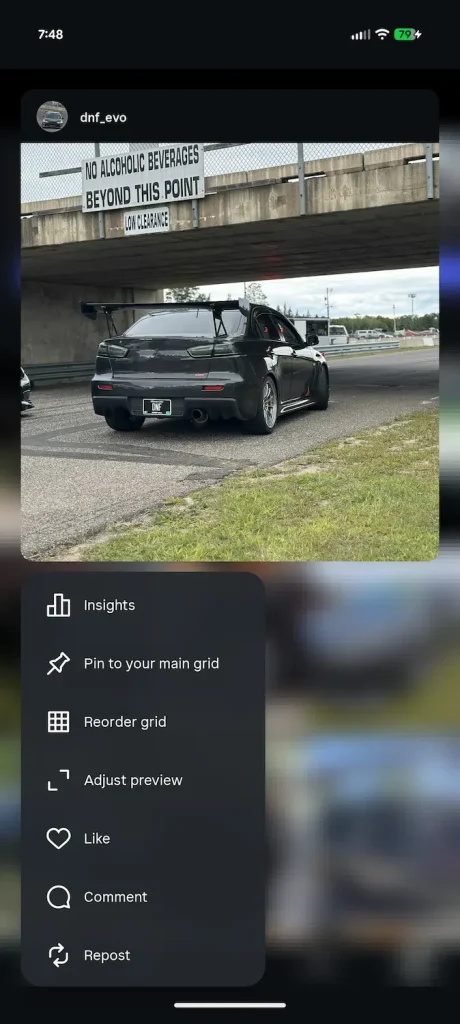

Instagram Reorder Grid Menu
Instagram Reorder Example

How to reorder your Instagram grid

  1. Go to your profile, to pull up your Grid
  2. Press and hold any photo (selection doesn’t matter at this point)
  3. A menu will pop up, select “Reorder grid”
  4. Press and hold any image you wish to reorder
  5. Once you release the image in place, the app auto saves (there is an undo button)

The process is simple and only takes a few seconds, making it much easier to maintain a curated profile without having to delete and re-upload content.

Reordering posts has been one of Instagram’s most requested profile customization features for years, particularly among creators, photographers, brands, and businesses that rely on a carefully organized grid. The new feature gives users significantly more flexibility over how their profiles appear to visitors.

Are you looking forward to the ability to reorder your Instagram grid? Let us know in the comments below.

App Update Grid Instagram Instagram Grid Reorder Grid
Share. Facebook Twitter Pinterest LinkedIn Tumblr Email
Matt Kinne

I golf, autocross, and spend way too much time messing with new phones and gadgets. FWNED is where I share smartphone news, leaks, reviews, and whatever else catches my attention in the tech world.

Related Posts

Samsung’s Next Smartwatches Certified with 10W Charging

June 6, 2026

Galaxy S26 FE Design Details Surface Early

June 6, 2026

Google Pixel 11 Wallpapers Leak: A Look at the Subdued New Palette [Gallery]

June 3, 2026

iPhone Fold Dummy Unit Reveals White Finish, Dual 48MP Cameras

June 2, 2026
Add A Comment

Comments are closed.

Editors Picks

18Birdies Pro Swing Analysis Review: Is a $15 Virtual Lesson Worth It?

June 9, 2026

FWNED Is Back!

June 8, 2026

Why I’m Paying for 18Birdies Premium Even Though It Leaves Android Users Behind

June 1, 2026
Related Posts

Samsung’s Next Smartwatches Certified with 10W Charging

By Matt Kinne

Galaxy S26 FE Design Details Surface Early

By Matt Kinne

Google Pixel 11 Wallpapers Leak: A Look at the Subdued New Palette [Gallery]

By Matt Kinne
Advertisement
FWNED
Facebook X (Twitter)
  • Write For Us
  • About Us
  • Contact
  • Sitemap
  • Privacy Policy
© 2026 FWNED

Type above and press Enter to search. Press Esc to cancel.