

Close Menu
  • Home
  • News
  • Leaks
  • Reviews
    • Phone Reviews
    • Tablet Reviews
    • Accessory Review
  • Android
  • Apple
  • Windows
  • Wallpapers
  • Contact
    • Tip Us
    • Press release or product review
What's Hot

Download the Official iOS 27 CarPlay Wallpapers

June 12, 2026

Nothing’s Massive U.S. Retail Win: Why the Best Buy Deal Changes Everything

June 12, 2026

The Galaxy Watch Ultra convinced me Google needs a Pixel Watch Ultra

June 11, 2026
Facebook X (Twitter)
FWNEDFWNED
  • Home
  • News
  • Leaks
  • Reviews
    • Phone Reviews
    • Tablet Reviews
    • Accessory Review
  • Android
  • Apple
  • Windows
  • Wallpapers
  • Contact
    • Tip Us
    • Press release or product review
FWNEDFWNED
Home » Android M features native WiFi calling, Project Fi baked in
Android

Android M features native WiFi calling, Project Fi baked in

Matt KinneBy Matt KinneMay 28, 201512 Comments2 Mins Read
Facebook Twitter Pinterest LinkedIn Tumblr Email
Android M WiFi calling
Share
Facebook Twitter LinkedIn Pinterest Email

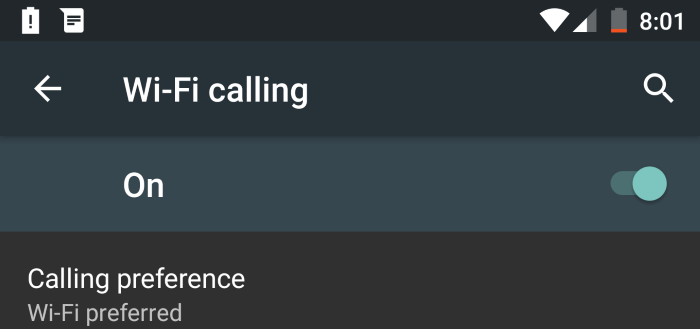
Android M isn’t necessarily as big as Android Lollipop in terms of overhauling the operating system, but that doesn’t mean it should go unmentioned. Android M touts many new features that its predecessor was lacking, such as quick setting toggles that are changeable, dark theming in the settings, and many performance enhancements. One feature that is new to stock Android altogether is WiFi calling.

Update: Upon some further digging into my phone and the installed applications on the Play Store app, I noticed Project Fi was installed on the device already. I went to the application drawer and it was nowhere to be found. So, on Android M, Fi comes baked into the operating system and that is why WiFi calling is included.

Google has added tons of things to Android M, but for the first time ever on a stock Android operating system form Google, it includes WiFi calling. WiFi calling is something that T-Mobile already embraces, as it is prevalent on many of their phones. Recently Google and T-Mobile partnered to bring WiFi calling to their carrier, but others are left out. Since Google already implemented WiFi calling into the T-Mobile Nexus 6 factory image, why not share the wealth?

In some areas, WiFi calling is a necessary feature, as service and reception can be sub-par at best. With the ability to enable WiFi calling, a user can use their internet connection to make phone calls, although it still counts against their minutes used.

To check out the WiFi calling settings on Android M, go to settings, more, then tap “WiFi calling”.

Since more and more features keep popping up with Android M, and more to come in the future, what’s your favorite so far? Let us know!


Android M Google WiFi calling
Share. Facebook Twitter Pinterest LinkedIn Tumblr Email
Matt Kinne

I golf, autocross, and spend way too much time messing with new phones and gadgets. FWNED is where I share smartphone news, leaks, reviews, and whatever else catches my attention in the tech world.

Related Posts

Nothing’s Massive U.S. Retail Win: Why the Best Buy Deal Changes Everything

June 12, 2026

The Galaxy Watch Ultra convinced me Google needs a Pixel Watch Ultra

June 11, 2026

Samsung Galaxy S27 Appears in GSMA Database Listing Under Model Number SM-S952U

June 9, 2026

Galaxy S26 FE Design Details Surface Early

June 6, 2026
Editors Picks

18Birdies Pro Swing Analysis Review: Is a $15 Virtual Lesson Worth It?

June 9, 2026

FWNED Is Back!

June 8, 2026

Why I’m Paying for 18Birdies Premium Even Though It Leaves Android Users Behind

June 1, 2026
Related Posts

Nothing’s Massive U.S. Retail Win: Why the Best Buy Deal Changes Everything

By Matt Kinne

The Galaxy Watch Ultra convinced me Google needs a Pixel Watch Ultra

By Matt Kinne

Samsung Galaxy S27 Appears in GSMA Database Listing Under Model Number SM-S952U

By Matt Kinne
Advertisement
FWNED
Facebook X (Twitter)
  • Write For Us
  • About Us
  • Contact
  • Sitemap
  • Privacy Policy
© 2026 FWNED

Type above and press Enter to search. Press Esc to cancel.