
Close Menu
  • Home
  • News
  • Leaks
  • Reviews
    • Phone Reviews
    • Tablet Reviews
    • Accessory Review
  • Android
  • Apple
  • Windows
  • Wallpapers
  • Contact
    • Tip Us
    • Press release or product review
What's Hot

Download the Official iOS 27 Wallpapers in High Resolution

June 9, 2026

18Birdies Pro Swing Analysis Review: Is a $15 Virtual Lesson Worth It?

June 9, 2026

Samsung Galaxy S27 Appears in GSMA Database Listing Under Model Number SM-S952U

June 9, 2026
Facebook X (Twitter)
FWNEDFWNED
  • Home
  • News
  • Leaks
  • Reviews
    • Phone Reviews
    • Tablet Reviews
    • Accessory Review
  • Android
  • Apple
  • Windows
  • Wallpapers
  • Contact
    • Tip Us
    • Press release or product review
FWNEDFWNED
Home » Android Lollipop hidden clickables [tips]
Android

Android Lollipop hidden clickables [tips]

Matt KinneBy Matt KinneJanuary 13, 2015No Comments2 Mins Read
Facebook Twitter Pinterest LinkedIn Tumblr Email
Android Lollipop tips from Phone Probe
Share
Facebook Twitter LinkedIn Pinterest Email

Android Lollipop tips from Phone Probe

Android Lollipop brought along with it tons of changes to the Android OS. Everything from animations, colors, and switch to ART runtime from Dalvik were changed. With all these new changes, some smaller things have been added; some things that Android Lollipop users might not even know about. We are about to show you all of the clickables in the notification panel and even a few in the status bar on Android 5.0 Lollipop.

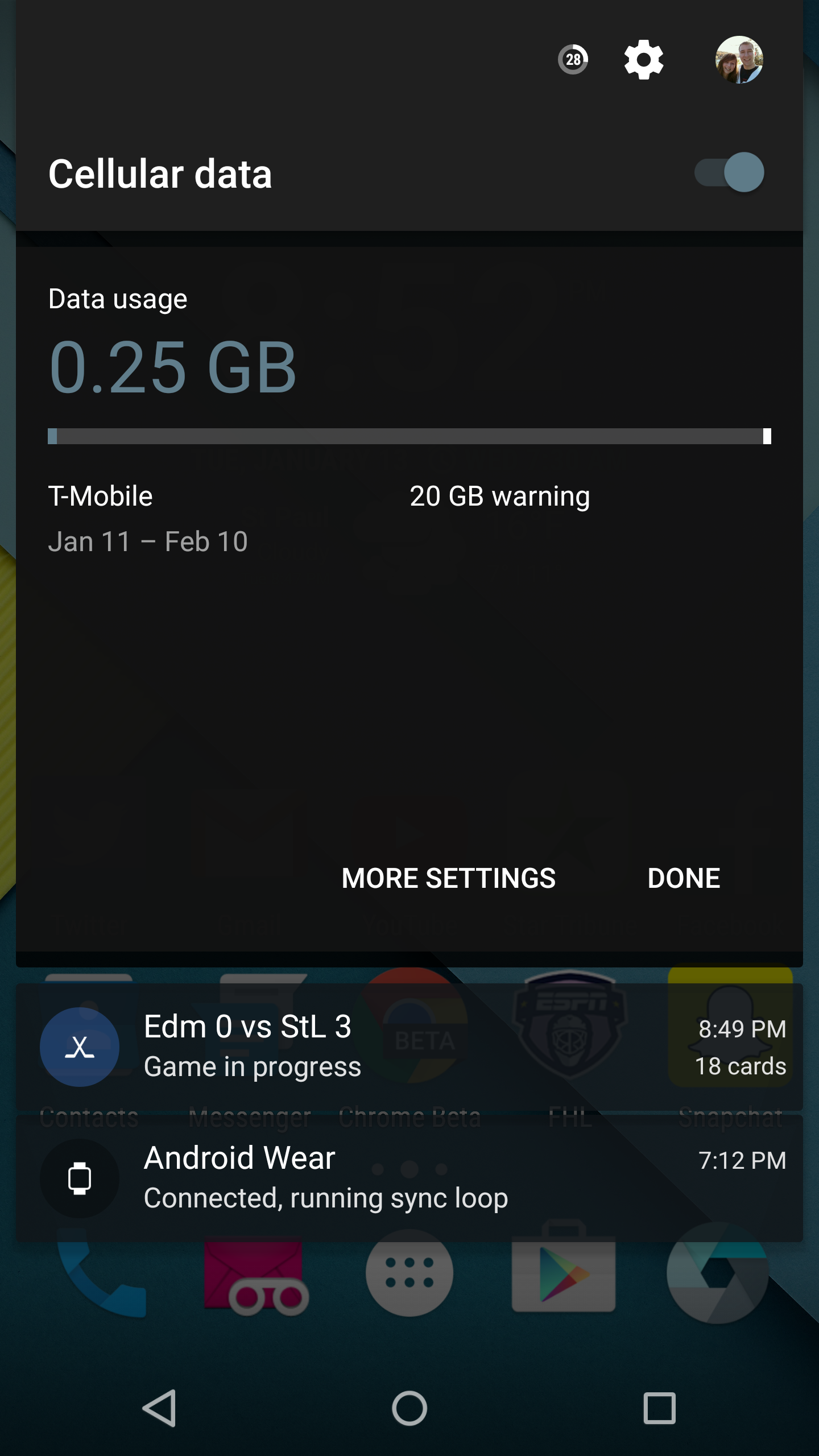
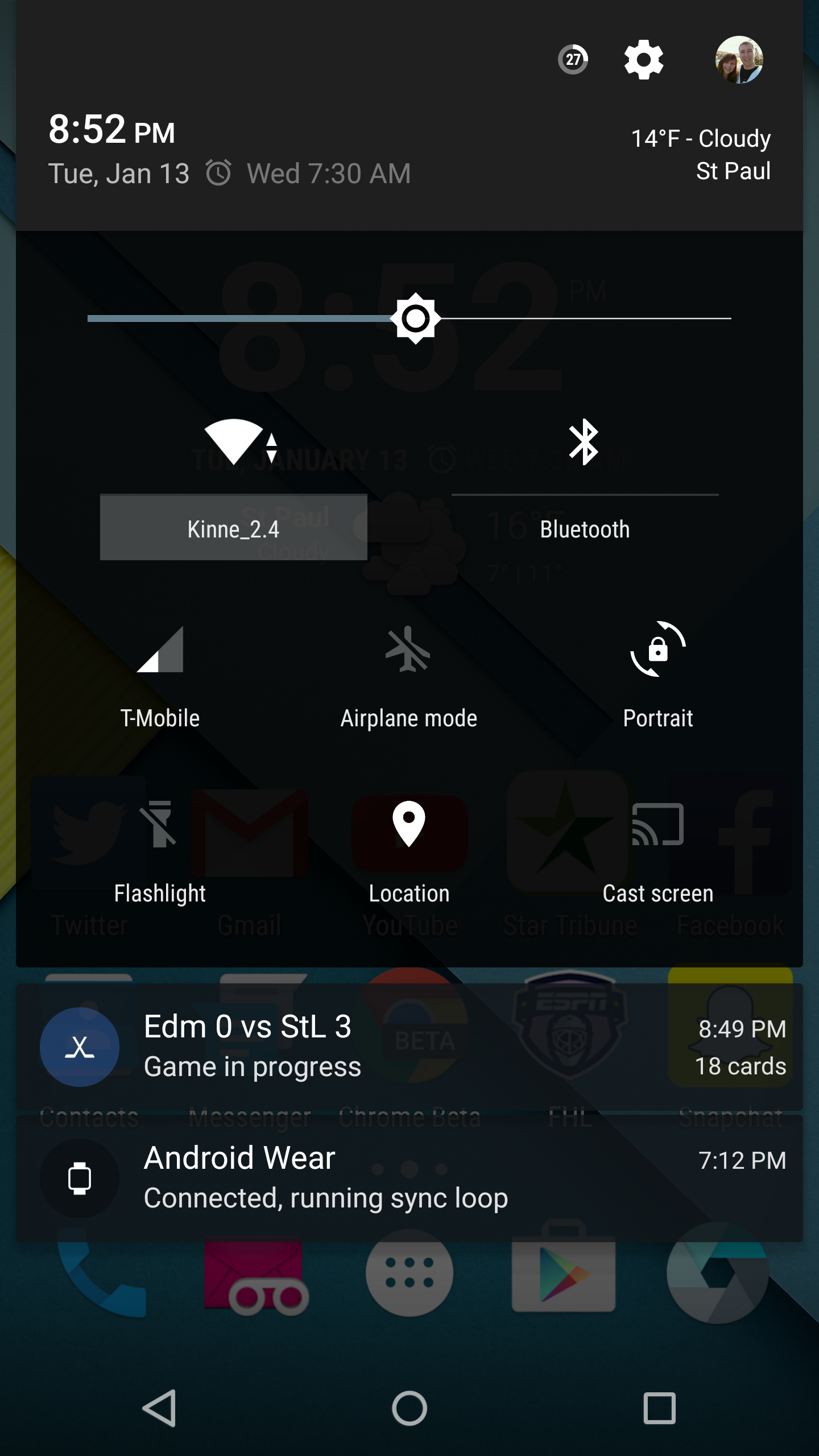
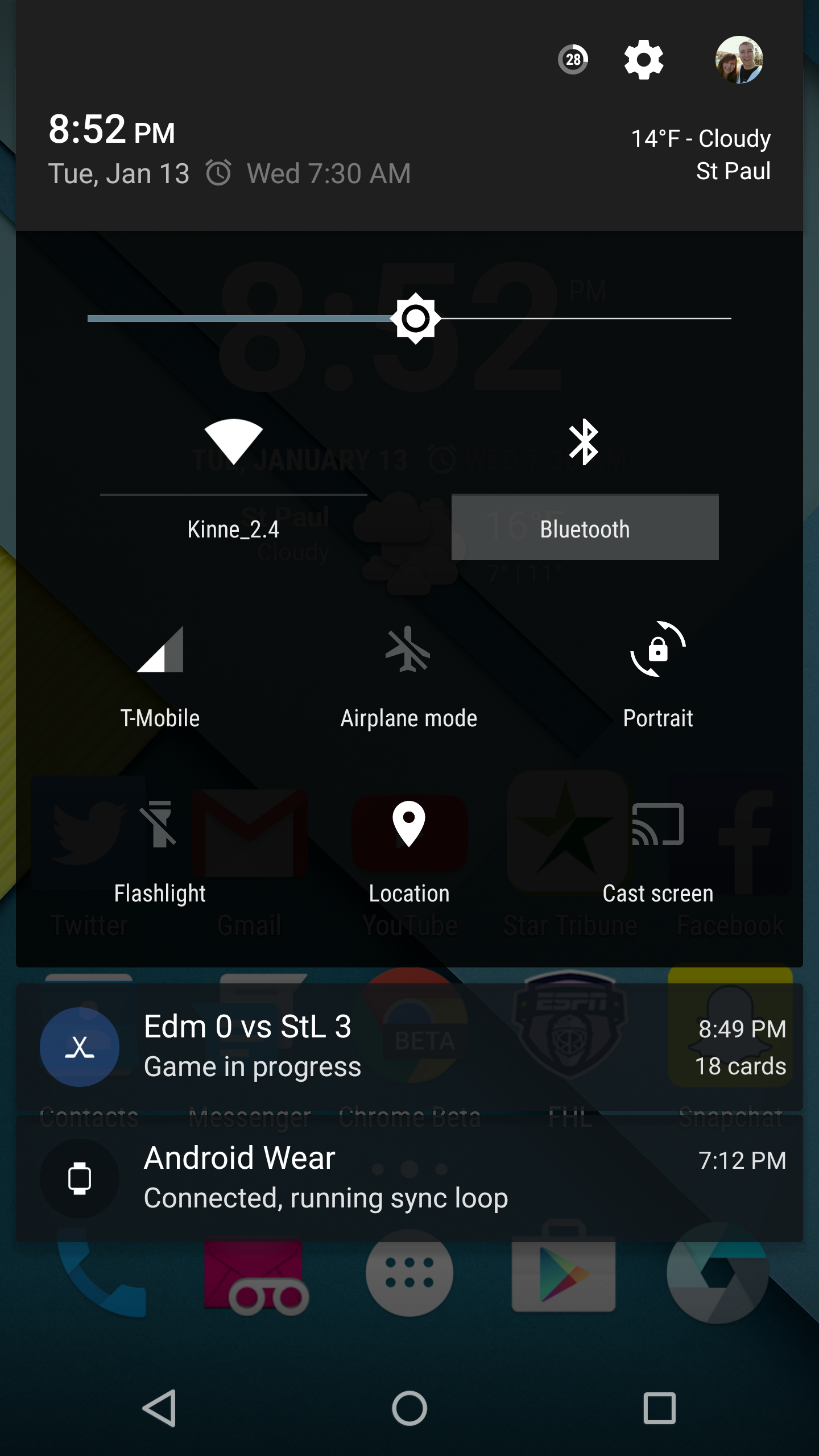
There are a few things that can be clicked in the notification that won’t automatically toggle. They include the network signal to view your used data, the Wi-Fi network name to view other networks in your area, and the Bluetooth writing underneath the Bluetooth logo to view available Bluetooth connections. Clickable options in the notifcation shade can be seen below.
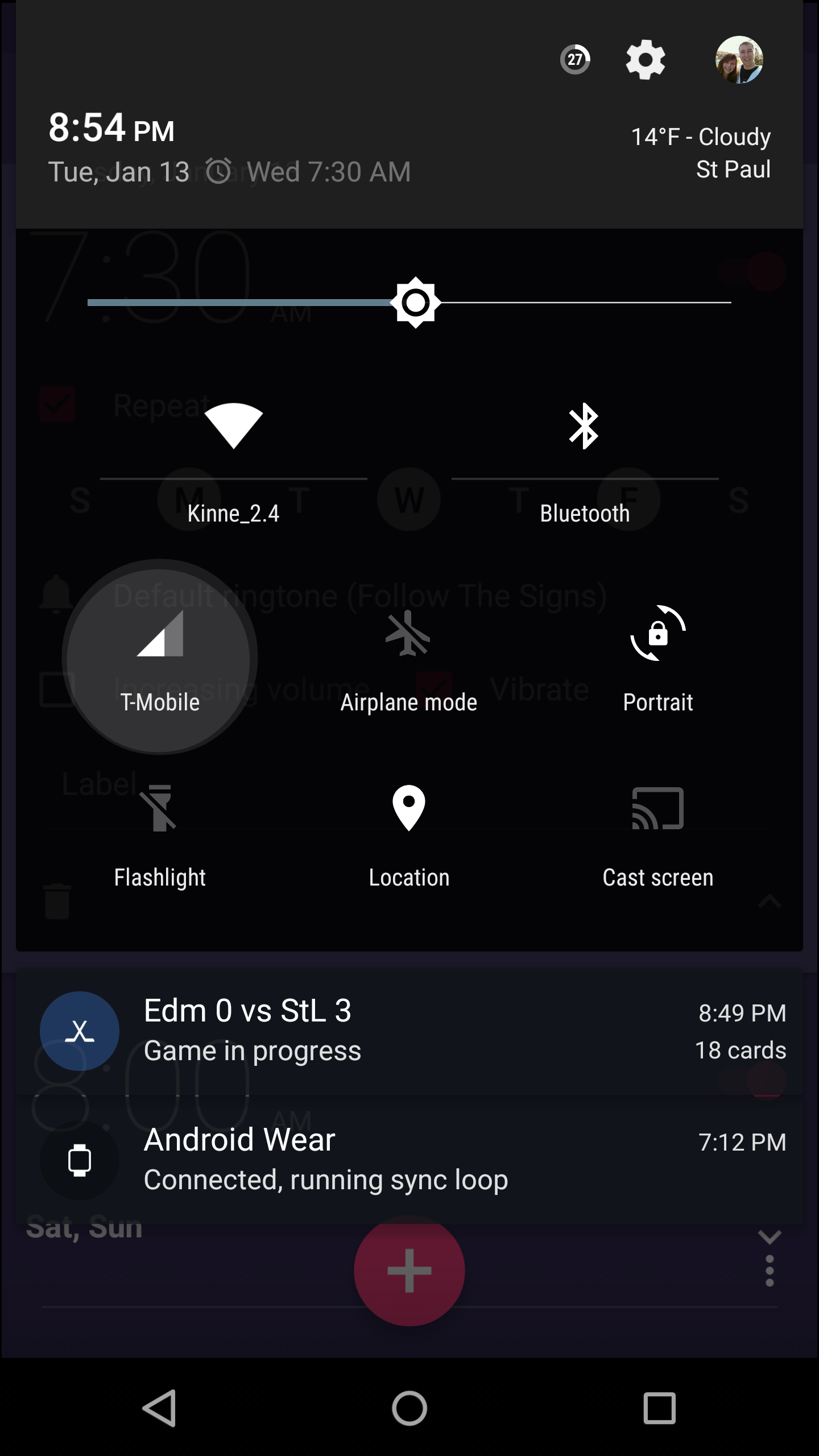
Android Lollipop clickables 1
Android Lollipop clickables 7
Android Lollipop clickables 5
Android Lollipop clickables 4

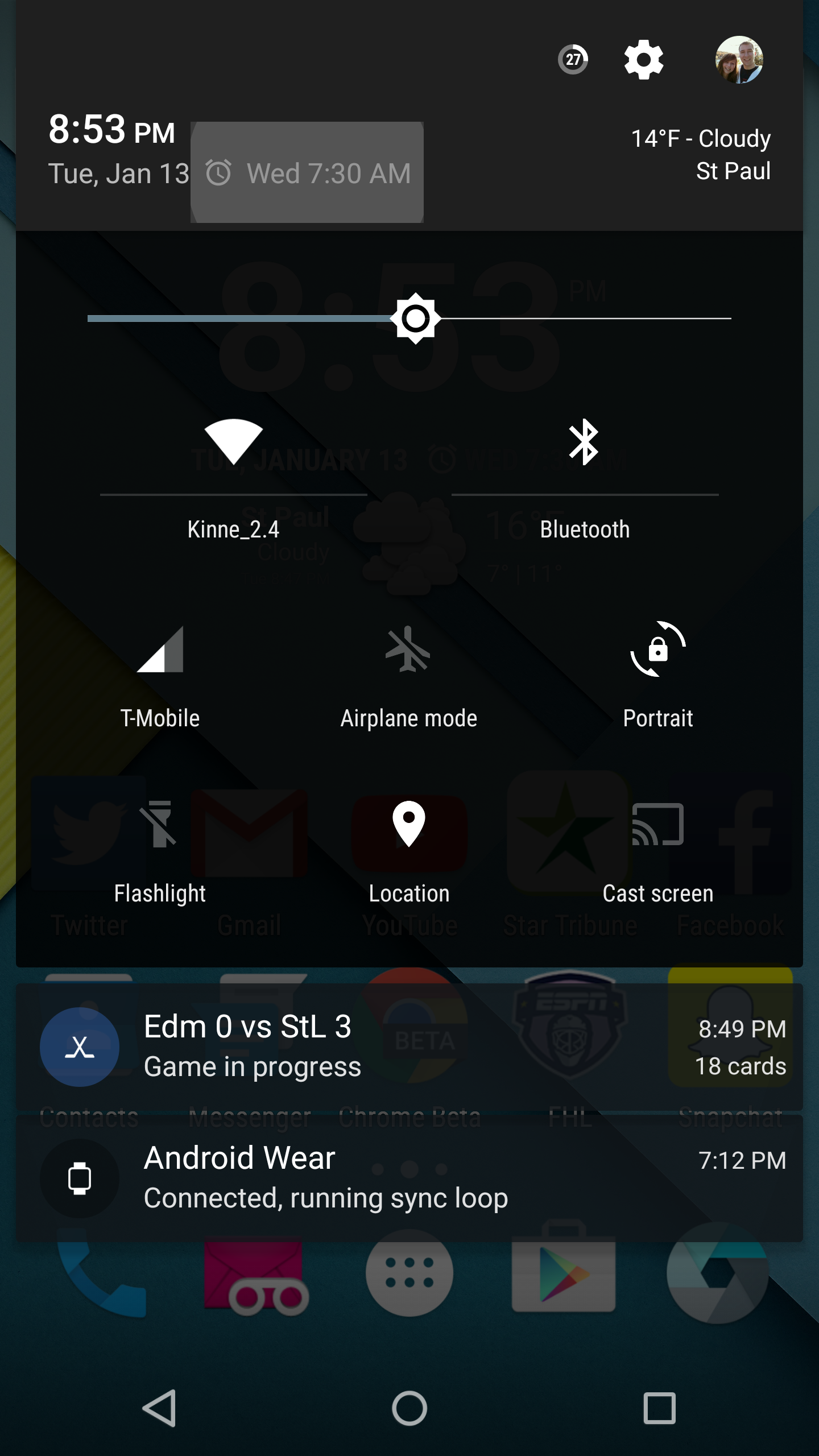
To go along with the clickables in the notification shade on Android Lollipop, there are a few clickables in the status bar as well. Clickables in the status bar include the date which takes you to your calendar app, the clock in the upper corner takes you to an overview of your alarms, and if you click the next live alarm, it’ll take you to your highlighted alarm where you can quick edit the days, time, etc. Clickable options in the status bar can be seen below.
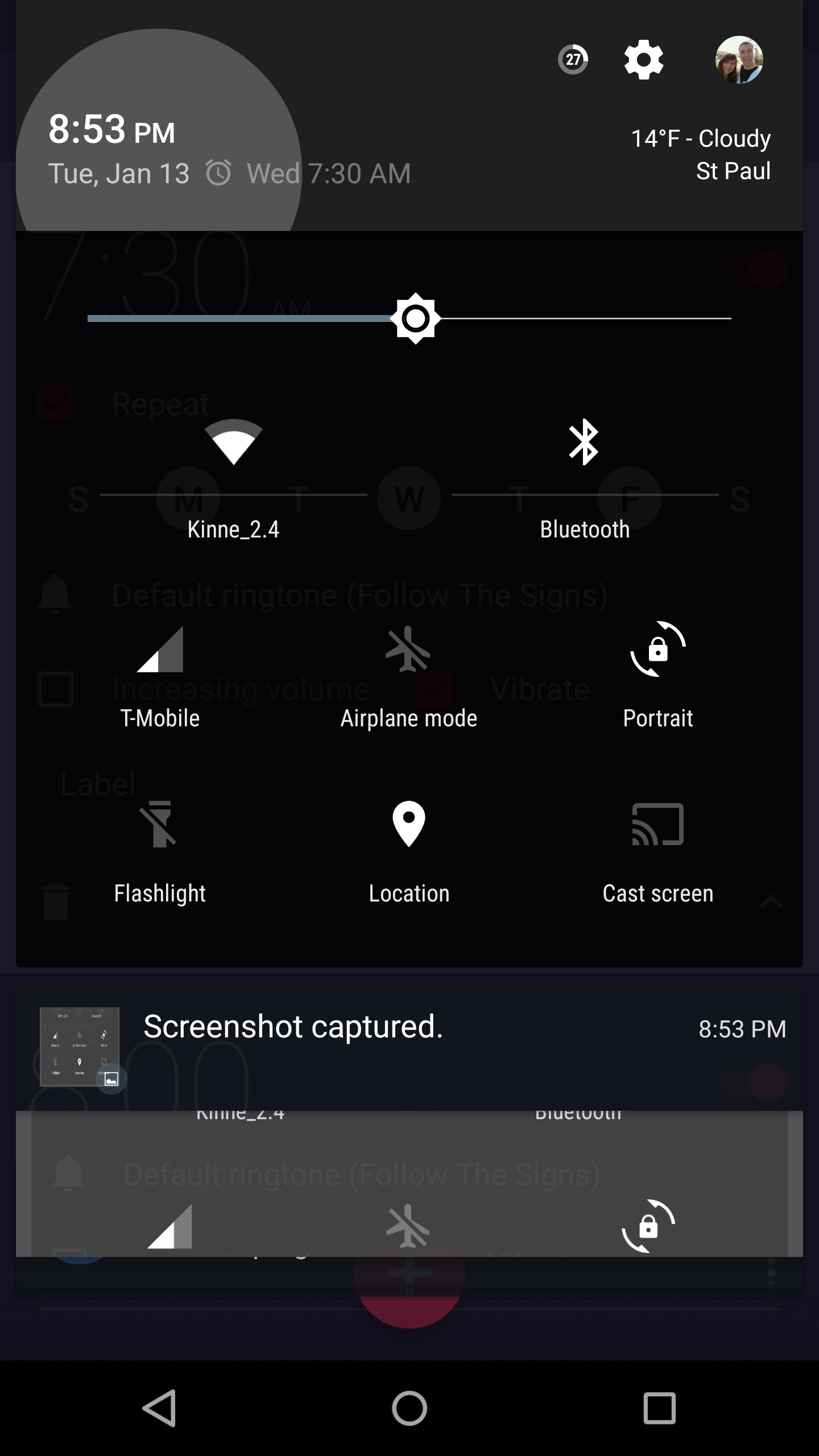
Android Lollipop clickables 2
Android Lollipop clickables 6

Many of these are known by die-hard Android users, but many of these helpful features go unknown by users who don’t explore their phone very much. If this quick-guide to hidden clickables on Android Lollipop helped you out, be sure to help us out and share this post.

The screenshots from this article are taken from a Nexus 6 running LiquidSmooth. That is why there is a weather toggle and circular battery icon in the top right corners. 

Android 5.0 Lollipop Android Lollipop Tips
Share. Facebook Twitter Pinterest LinkedIn Tumblr Email
Matt Kinne

Related Posts

Samsung Galaxy S27 Appears in GSMA Database Listing Under Model Number SM-S952U

June 9, 2026

Galaxy S26 FE Design Details Surface Early

June 6, 2026

Motorola Edge (2026) Launching June 11: Smaller Display and New Cameras for $599

June 2, 2026

How to enable the status bar battery percentage in iOS 16

August 8, 2022
Editors Picks

18Birdies Pro Swing Analysis Review: Is a $15 Virtual Lesson Worth It?

June 9, 2026

Why I’m Paying for 18Birdies Premium Even Though It Leaves Android Users Behind

June 1, 2026
Related Posts

Samsung Galaxy S27 Appears in GSMA Database Listing Under Model Number SM-S952U

By Matt Kinne

Galaxy S26 FE Design Details Surface Early

By Matt Kinne

Motorola Edge (2026) Launching June 11: Smaller Display and New Cameras for $599

By Matt Kinne
Advertisement
FWNED
Facebook X (Twitter)
  • Write For Us
  • About Us
  • Contact
  • Sitemap
  • Privacy Policy
© 2026 FWNED

Type above and press Enter to search. Press Esc to cancel.