

Close Menu
  • Home
  • News
  • Leaks
  • Reviews
    • Phone Reviews
    • Tablet Reviews
    • Accessory Review
  • Android
  • Apple
  • Windows
  • Wallpapers
  • Contact
    • Tip Us
    • Press release or product review
What's Hot

Google Needs to Revert This Android 17 Always-On Display Change

June 15, 2026

Samsung’s Next Foldables and Galaxy Watch 9 Appear in FCC Filings Ahead of Launch

June 15, 2026

Download the Official iOS 27 CarPlay Wallpapers

June 12, 2026
Facebook X (Twitter)
FWNEDFWNED
  • Home
  • News
  • Leaks
  • Reviews
    • Phone Reviews
    • Tablet Reviews
    • Accessory Review
  • Android
  • Apple
  • Windows
  • Wallpapers
  • Contact
    • Tip Us
    • Press release or product review
FWNEDFWNED
Home » Android Wear can now find your phone
News

Android Wear can now find your phone

Matt KinneBy Matt KinneMarch 19, 2015No Comments2 Mins Read
Facebook Twitter Pinterest LinkedIn Tumblr Email
Android Wear can now find your lost phone
Share
Facebook Twitter LinkedIn Pinterest Email

Android Wear can now find your lost phone

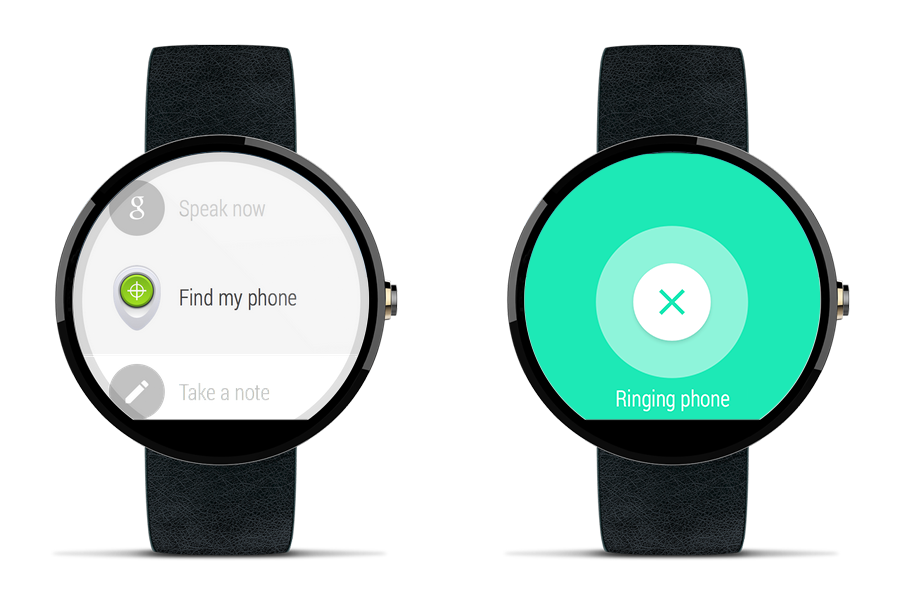
Android Wear is still relatively young, but its features continue to grow through updates. Today, the Official Android Blog announced that the Android Device Manager will now support Android Wear. That means you will now be able to find your phone by saying “Ok, Google. Start. Find my phone.” Your phone will then ring at full volume no matter the setting.

The update isn’t out just yet, but it will be in the coming weeks. We will continue to keep you in the loop when the update starts hitting the airwaves. The entire press release can be seen below.

In 2013 we introduced Android Device Manager to help you locate and secure your Android devices. Since then Android Device Manager has helped reunite almost 30 million users with their wayward phones and tablets.

Today we’re making Android Device Manager even more useful by introducing support for Android Wear to help you find your lost device. Misplaced your Android phone? No problem! Android Wear connects your phone to your wrist, and together with Android Device Manager, you can make sure it stays that way.

To use this new feature, just say ‘Ok, Google. Start. Find my phone,’ or select the ‘Find my phone’ option in the Start menu. Your phone will ring at full volume, and you’ll be that much closer to, well, finding your phone.

Best of all, you won’t need to do anything to enable this new feature. It’s rolling out to all Android Wear devices over the next few weeks.

Source

Android Android Wear Smartwatch Update
Share. Facebook Twitter Pinterest LinkedIn Tumblr Email
Matt Kinne

I golf, autocross, and spend way too much time messing with new phones and gadgets. FWNED is where I share smartphone news, leaks, reviews, and whatever else catches my attention in the tech world.

Related Posts

Instagram Finally Lets Users Reorder Their Grid, Here’s How!

June 11, 2026

Samsung Galaxy S27 Appears in GSMA Database Listing Under Model Number SM-S952U

June 9, 2026

Samsung’s Next Smartwatches Certified with 10W Charging

June 6, 2026

Galaxy S26 FE Design Details Surface Early

June 6, 2026
Editors Picks

18Birdies Pro Swing Analysis Review: Is a $15 Virtual Lesson Worth It?

June 9, 2026

FWNED Is Back!

June 8, 2026

Why I’m Paying for 18Birdies Premium Even Though It Leaves Android Users Behind

June 1, 2026
Related Posts

Instagram Finally Lets Users Reorder Their Grid, Here’s How!

By Matt Kinne

Samsung Galaxy S27 Appears in GSMA Database Listing Under Model Number SM-S952U

By Matt Kinne

Samsung’s Next Smartwatches Certified with 10W Charging

By Matt Kinne
Advertisement
FWNED
Facebook X (Twitter)
  • Write For Us
  • About Us
  • Contact
  • Sitemap
  • Privacy Policy
© 2026 FWNED

Type above and press Enter to search. Press Esc to cancel.